
Running the business
Stock & inventory
Items, stock movements, transfers between branches, and requisitions.
Inventory is the record of what you have, what it cost, what it sells for and where it is. Everything that touches stock — a sale, a return, a transfer, a stocktake — goes through it.
Two kinds of item
| Type | What it is | Appears in your shop |
|---|---|---|
| Product | Something you sell | Yes, if marked storefront-visible |
| Internal | Something you use — supplies, tools, equipment | Never |
The split matters because a business that tracks its own printer paper alongside its stock should not have to worry about a customer finding it.
The one rule about quantities
You never set a quantity directly. Every change creates a stock movement — a row in a ledger that only ever grows — and the quantity you see is the sum of that ledger.
| Movement | When |
|---|---|
| Purchase / Adjustment in | Stock arrives, or a count corrects upward |
| Sale | An item is sold |
| Return | A customer brings something back |
| Transfer out / in | Stock moves between branches |
| Adjustment out | Damage, loss, a count correcting downward |
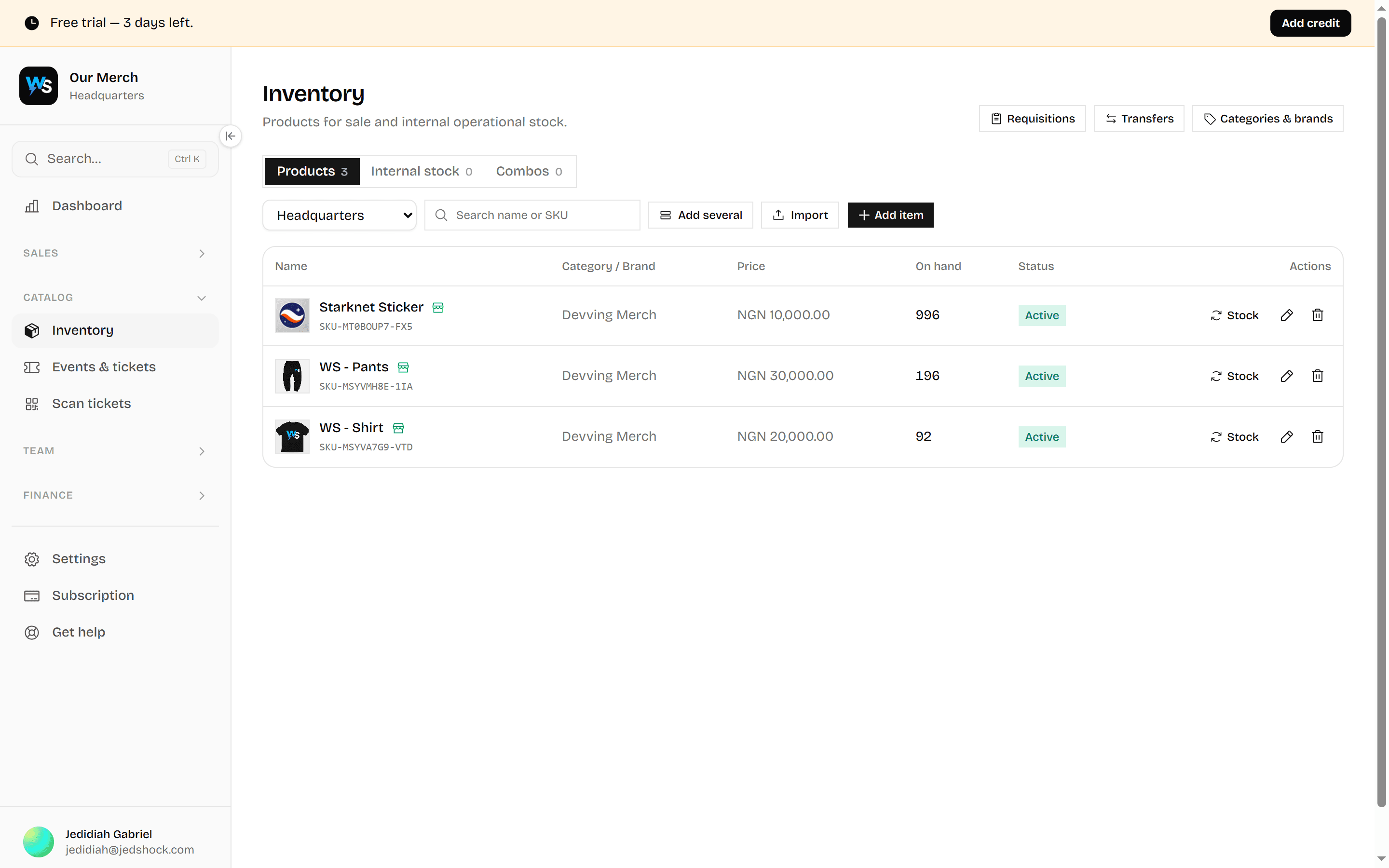
Adding stock
Open Inventory
Add the item
Name, category, brand, cost price, selling price.
Set a reorder level
The point at which you want warning. Below it, the item shows in low-stock alerts.
Adjust the stock
Add, remove or set. Every option writes a movement — even "set", which writes the difference.
Decide if customers see it
Mark it storefront-visible. Add images — the first one becomes the card.
Negative stock
By default an item cannot go below zero — selling what you do not have is usually a mistake, and one that only surfaces when a customer is waiting.
Some businesses genuinely need it: a kitchen that sells a dish before the delivery is booked in, a shop taking backorders. That is a per-item switch, not a global one.
Spec sheets
Some things need more than a description. A vehicle has a year, a mileage, a transmission; a phone has storage and a screen size. Attribute profiles give a category its own vocabulary, and the fields you mark as highlights appear on the product card.
You can use a built-in profile or write your own.
More than one branch
Transfers
Inventory → Stock transfers moves stock between branches. A transfer is two movements — out of one branch, into the other — written together, so stock is never in both places or neither.
Requisitions
Inventory → Requisitions is a branch asking headquarters for stock. It has a request, an approval and a fulfilment, so the question "did anyone actually approve this" always has an answer.
Barcodes
Items can carry a barcode. With one, the storefront till becomes scan-first, and the inventory list gains a scanner.
Barcodes are staff-only and never reach a customer's page source. If your business has no scanner, turn the whole barcode surface off in Settings → Storefront rather than living with buttons that do nothing for you.
Low stock
Any item below its reorder level shows in low-stock alerts on the dashboard and in inventory. There is no automatic reordering — what to buy and when is a judgement about cash, not a threshold.
Every page in this area
| Page | What it does | Needs |
|---|---|---|
| Products | The physical products you sell — prices, quantities, and what's running low. Stock only ever moves through a recorded movement, so the count is always explainable. | Inventory · read |
| Requisitions | Ask the stockkeeper for internal supplies, and approve or issue what other staff have asked for. | Requisition · request |
| Stock transfers | Move stock between branches, with both sides of the movement recorded. | Inventory · transfer |
| Services | The work you sell — consultations, repairs, appointments — and memberships that grant access for a period. | Services · read · Services & Digital Products switched on |
| Digital products | Anything customers download after paying — e-books, music, albums, PDFs, templates, courses, software, photos and videos. Set a limited run or sell without limit. | Services · read · Services & Digital Products switched on |
| Validate member | Scan a membership card to check it's genuine and still in date before letting someone in. | Services · validate · Services & Digital Products switched on |
| Events & tickets | Dated events you sell admission to, the tickets issued for them, and who is allowed to scan at the door. | Events · read · Events & Tickets switched on |
| Scan tickets | Check people in at the door. A ticket scans once — the second attempt shows who came in on it and when. | Tickets · scan · Events & Tickets switched on |
| Reservations | Bookings for rooms, halls and other bookable space — who has what, and when they arrive and leave. | Reservations · read · Reservations switched on |