
Selling
Selling
The till, the wallet, deficits and close of business.
A sale moves stock, takes money and writes to your books in one step. There is no separate till system to reconcile at the end of the day, because the till and the shop are the same thing.
Where a sale can start
| Origin | Who starts it |
|---|---|
| The storefront | A customer, online |
| POS mode | Staff, scanning at the counter |
| Sales screen | Staff, entering by hand |
| A QR scan point | A customer at a table or desk |
| A partner link | A partner selling on your behalf |
All of them produce the same sale record. Origin is kept, so you can tell what your shop earned versus what the counter earned.
Payment channels
Every sale is settled through a channel, and each channel keeps its own balance:
- Cash — physical money, held by whoever took it
- Bank transfer — into one of your accounts, verified before it counts
- Card / online — through a gateway
- Crypto — on-chain, confirmed by the network
- Gift card — redeemed against a balance you already issued
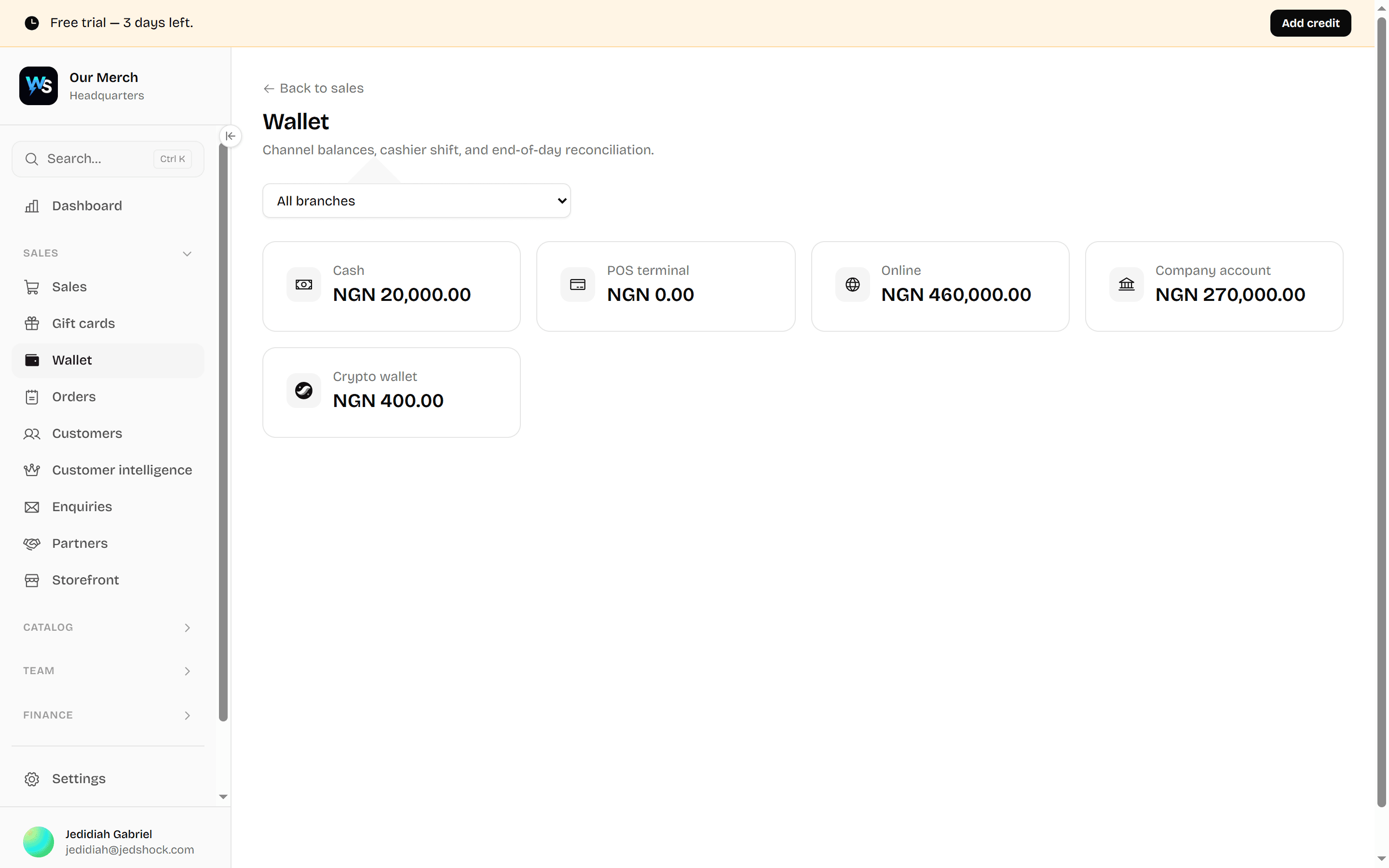
The wallet
Sales → Wallet shows what each channel holds right now. It is the answer to "how much money does this business actually have, and where".
Close of business
At the end of a shift, Close of business asks whoever held cash to declare what they are handing over. Declared against expected produces a difference, and that difference is recorded rather than argued about.
Count what you have
Physical cash, per person holding it.
Declare it
Enter the counted figure.
The difference is recorded
Short or over, it is written down with a name against it.
Shortages become deductions
An unresolved shortage carries into payroll rather than evaporating.
Deficits
Sales → Deficits lists sales that did not fully settle — a customer who paid part, a transfer that never arrived, a shortage at close. They stay visible until resolved.
Bank transfers
A customer saying they have sent a transfer is not the same as money arriving. Sales → Bank transfers holds claimed transfers until somebody with the right permission confirms the money is in the account.
Returns and refunds
A return puts stock back and reverses the money through the channel it came from. Both write movements — the original sale is never edited.
Discounts and coupons
Sales → Coupons creates codes customers can use at checkout. Staff can also discount at the till if their role allows it, and every discount is recorded against the person who gave it.
Gift cards
Gift cards issues cards with a balance. A card is money you have already been paid for and owe as goods, so it sits in your books as a liability rather than as takings.
Every page in this area
| Page | What it does | Needs |
|---|---|---|
| Sales | Record a sale and see every sale made — who sold it, how it was paid for, and what was returned or refunded. | Sales · read |
| Gift cards | Sell gift cards from your shop or hand them out at the counter, and see what you still owe in goods. | Sales · read |
| Wallet | Money in the business, split by where it sits — cash, each bank account, each POS terminal and the online wallet. | Payments · read |
| Close of business | End the day: count each channel, hand over, and record any shortage against the person responsible. | Payments · read |
| Crypto wallet | The business crypto balance: what you hold, what it is worth today, sending it out, and shielding it so the public chain stops showing it. | Crypto · read |
| Bank transfers | Customers who paid you by transfer and uploaded their receipt. Check the money arrived, then confirm — that is what marks the order paid. | Payments · verify |
| Deficits | Shortfalls still outstanding — money a sale expected that never arrived, and who has to answer for it. | Sales · read |
| Coupons | Discount codes — create them, set what they take off, and see which ones are being used. | Sales · manage |
| Orders | The live board of what's been ordered and not yet handed over, including anything bought on your website. | Order · read |
| Order origins & QR codes | The QR codes customers scan — one per table, room or desk — so an order arrives knowing where it came from. | Origin · manage |
| Customers | Everyone who has bought from you, what they bought, and how to reach them. Send an individual an update from here. | Customers · read |
| Customer intelligence | Who spends most, who has drifted away, whose birthday is coming up, and what each customer actually buys. The people counterpart to product profitability. | Customers · read |
| Enquiries | Messages sent in from your public website — contact forms, quote requests, sell-your-item enquiries. Every one is a lead nobody has answered yet. | Contacts · read |
| Offers | Create offers and announcements for your shop, then notify customers who subscribe to offers. | Offers · read |
| Partners | People who sell your stock for you. Their sales, the commission they've earned, and what you still owe them. | Partners · read |
| Storefront | Your public shop exactly as a customer sees it — useful for checking what's listed before you send someone the link. | Any signed-in staff · Storefront switched on |